
)
Grinding online poker is a marathon, not a sprint, especially when you’re staring down twelve tables of cash game action simultaneously.
If you’ve ever felt your heart rate spike as three "Time Bank" warnings beep at once, you know that manual clicking is the enemy of profit. To transition from a casual grinder to a high-volume beast on platforms like Natural8, you need more than just a solid poker strategy; you need a cockpit that responds to your thoughts in milliseconds.
Efficiency in multi-tabling isn't just about playing more hands—it’s about reducing the cognitive load of the "boring stuff" so your brain stays fresh for the high-stakes decisions.
Why Your Mouse is Killing Your Win Rate
Most poker players start their journey by dragging a cursor across the screen, a habit that is perfectly fine for a single live poker game but disastrous for high-volume digital play. When you’re playing more tables, the distance your mouse travels adds up to physical fatigue and "click-lag." By the time you’ve moved your mouse from Table 1 to Table 6 to hit Fold, you’ve likely missed a subtle betting tell on Table 3.
To achieve 24 tabling levels of efficiency (or even just a comfortable 4 to 8 tables), you must transition to keyboard shortcuts. This shift transforms your setup from a slow, reactive process into a streamlined, proactive machine.
Configuring the Ultimate Hotkey Setup
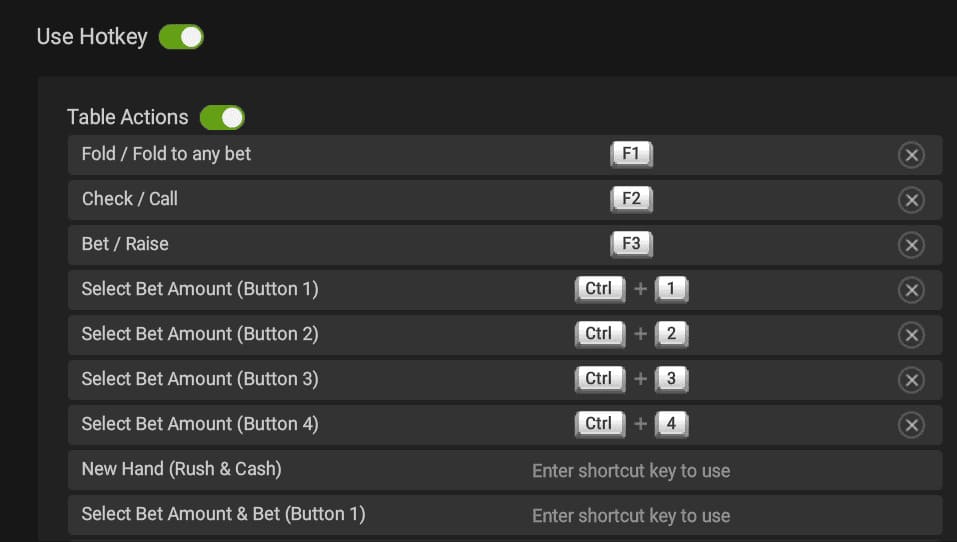 Setting up your key combination preferences is the first step toward professional-grade volume. Natural8 offers a robust built-in system, but knowing which buttons to map is where the magic happens. Your goal is to keep your left hand on the keyboard and your right hand on the mouse, minimizing unnecessary movement.
1. The Core Action Trinity: Fold, Check/Call, Bet/Raise
These are your bread and butter. You will use these thousands of times per session, so they need to be the most accessible keys on your board.
Fold (S or F): This is your most-used key. I recommend 'S' if you use a WASD-style layout. In fast-fold poker game like Rush & Cash, being able to instant-fold junk hands allows you to cycle through the number of tables at lightning speed.
Check / Call (W or Space): This key handles your passive actions. Using the Spacebar is a popular choice because it’s hard to miss during a chaotic session.
Bet / Raise (D or R): The "aggressive" key. This usually brings up your sizing options or executes the bet.
If you are afraid of misclicks, we recommend you to use a modifier like “CTRL”.
2. Advanced Navigation: Active Table vs. Table Under Mouse
This is a critical distinction for high-volume grinders.
Active Table: Your hotkeys only affect the table that is currently highlighted or "popped up."
Table Under Mouse: This is often the superior choice for experts. Your hotkey works on whichever table your cursor is hovering over, regardless of which one popped up last. This prevents "misclicks" where you accidentally fold a set of Aces because a different table jumped to the front right as you pressed the key.
How to Improve High-Volume Play Using Multi-Tabling Poker Tips
Success isn't just about the keyboard shortcuts; it's about the environment you build around them. If you’re trying to increase your tables at a time, you need to manage your "mental RAM."
Optimizing Your Visual Real Estate: Natural8 Layouts
Unlike traditional platforms that offer a simple "Stack" button, Natural8 provides more dynamic ways to manage your screen real estate. To scale your hands per hour without collapsing your win rate (bb/100), you need to master the three specific layout options available in the client.
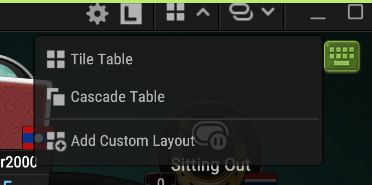
1. Tile Tables: Maximum Information
This layout automatically resizes every active table to fit side-by-side on your monitor without overlapping.
The Advantage: This is the gold standard for players who rely on HUD-style data (via the Smart HUD) and tracking player flow. You can see who is playing a "Lag" (Loose-Aggressive) style versus a "Nit" in real-time across all games.
The Downside: As you move toward 12+ tables, the windows become smaller, making it harder to read the exact bet sizing or card suits. It also requires significant "eye-scanning," which can lead to physical fatigue.
2. Cascade Tables: The Middle Ground
Cascading overlaps your tables diagonally, like a deck of cards spread out.
The Advantage: This keeps your focus on the "Active Table" while allowing you to see the "header" of every other table. It's excellent for MTT (Multi-Table Tournament) players who need to keep an eye on their M-ratio or blinds on other tables without having them take up the full screen.
The Logic: It mimics the "Stacking" feel because your mouse doesn't have to travel far, but keeps other tables accessible with a single click.
3. Custom Layout: The "Pro" Setup
This is where the high-volume beasts truly thrive. The Custom Layout allows you to use a specific configuration of table sizes and positions.
The Strategy: Many pros use a "Hybrid Layout." They will Tile their most important tables (like a Final Table or a high-stakes cash game) on one side of the screen and use a tight Cascade for their "standard" volume tables on the other.
The Pro Tip: Use the "Custom" feature to set a "Hot Zone." By placing your tables closer to the center of your vision, you reduce the physical strain of moving your eyes (and your cursor) across ultra-wide monitors.
Why Natural8 is different: The platform uses Smart Focus, which automatically brings the table requiring action to the front. This effectively creates a "Stacking" experience regardless of your layout.
Customized Hotkeys for Bet Sizes
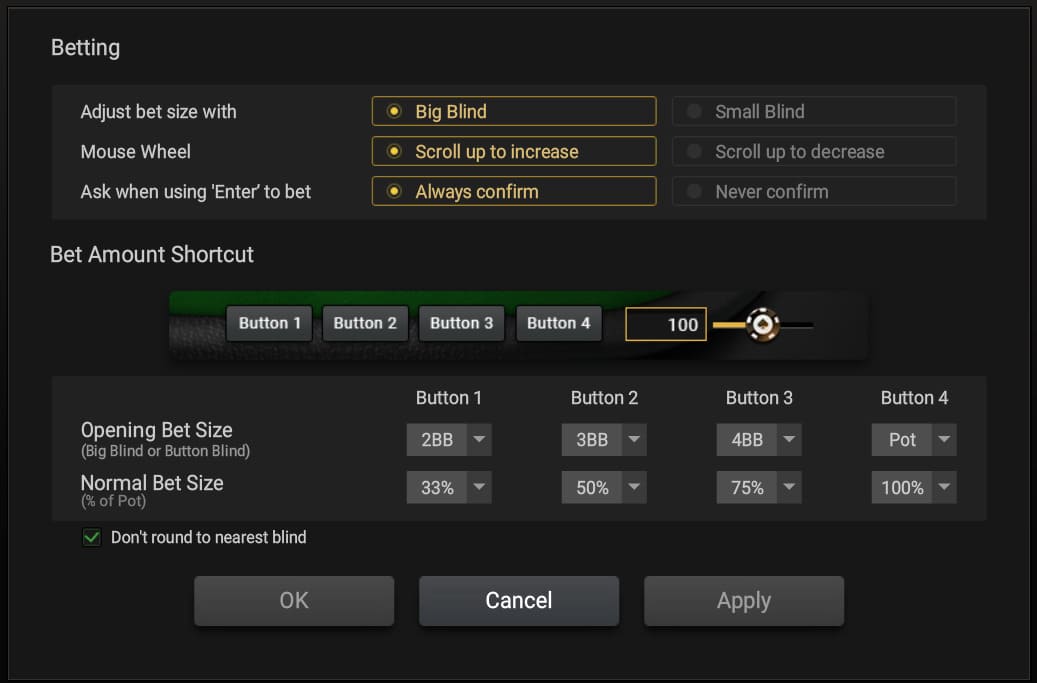
You shouldn't be manually typing "3.5 big blinds" into a box. Use the Natural8 settings to pre-set your Bet / Raise buttons for pre-flop and post-flop actions. This turns complex arithmetic into a simple function key tap.
Playing Tight but Aggressive
When you increase the number of tables, your "read" on individual recreational players diminishes. To compensate, playing tight in the early positions becomes even more vital. You want to simplify your ranges so that your "auto-pilot" is still a winning strategy.
Reducing Reaction Time with Fast-Fold Strategy
In games like Rush & Cash, the speed is relentless. The moment you click Fold, you are whisked away to a new target table with a fresh hand. This is where your assigning hotkeys truly pays off. If you can shave 0.5 seconds off every decision, over a 1,000-hand session, you’ve saved nearly 10 minutes of pure "dead time." That is 10 minutes more of actual play, increasing your hourly rate significantly.
Pro Tip: Don't try to go from 2 tables to 12 overnight. Add one table at a time every few days. If you find yourself "clicking buttons" without knowing why you're making the move, you've hit your current ceiling. Scale back down until your logic catches up with your fingers.
Summary Table: Optimized Hotkey Layout
| Action | Recommended Key | Logic |
|---|---|---|
| Fold | S or F | Easy reach for the most frequent action. |
| Check/Call | Spacebar | Large target, reduces errors during fast play. |
| Bet/Raise | D or R | Positioned for quick aggressive responses. |
| All-In | CTRL + A | Requires a modifier to prevent accidental busts. |
Disclaimer: The table above is just a suggestion, based on what the author uses. Always make sure to test out your hotkeys beforehand.
Conclusion: Mastering the Machine
Technical skill at the poker table will only take you so far if your interface is holding you back. By transitioning from a mouse-heavy "reactive" style to a hotkey-driven "proactive" setup, you aren't just playing faster—you're playing smarter. You are freeing up the mental energy required to spot that one subtle timing tell or calculate a complex ICM spot that could be the difference between a min-cash and a trophy.
Remember: Volume is a tool, not a goal. Use these Natural8 layout and hotkey tips to find your personal "sweet spot" where your hourly rate peaks without your decision-making quality dipping.
Always ensure you are playing within your bankroll limits and check out our [Responsible Gaming Guide] if you feel the grind is becoming overwhelming.
Frequently Asked Questions
1. Is it better to use a controller or a keyboard for poker hotkeys?
While many pros use third-party tools to map actions to a gaming controller (like an Xbox or PlayStation remote), a keyboard remains the gold standard for reliability and speed. The key is consistency. Whether you use function keys or a dedicated numpad, ensuring your key combination feels like second nature is more important than the specific hardware you choose.
2. How do hotkeys help prevent "poker tilt" during high-volume sessions?
Tilt often stems from feeling overwhelmed or making "misclicks" that cost money. By assigning hotkeys, you automate the physical mechanics of the game. This creates a sense of control and reduces the friction of action at the poker table. When the interface feels like an extension of your body, you can stay focused on your poker strategy rather than fighting with your mouse.
3. Can I use hotkeys on mobile versions of Natural8?
Currently, hotkey functionality is primarily a feature of the desktop client. Mobile play relies on touch gestures, which inherently limits your ability to play multiple tables efficiently. For true high-volume grinding (more than 4 tables), the desktop version with a customized keyboard shortcuts setup is vastly superior for maintaining a high win rate.
4. What is the "Table Under Mouse" setting, and why is it recommended?
This setting ensures that whichever table your cursor is hovering over becomes the target table for your hotkeys. It is a lifesaver for online poker players because it prevents the "stealing of focus." Without it, a table might pop up right as you're about to click, causing you to take an unintended action at the poker table you weren't even looking at.
5. Does playing more tables always lead to higher hourly profits?
Not necessarily. There is a "sweet spot" where your volume and win rate (BB/100) intersect for maximum profit. If you go from 4 tables to 24 tables, your win rate will almost certainly drop because you can't focus on exploitative reads. The goal of using multi-tabling poker tips is to find the maximum number of tables you can play while still maintaining a positive, high-quality decision-making process.
)
Shane C
Shane is a content writer with over 10 years of writing experience. He specializes in poker and casino games and has been chasing the ultimate poker dream and the excitement of hero calls for the last 15 years! Admittedly, he has yet to win any APT nor WSOP title, but he's not giving up!
)
)
)
)
)
)
)